
Pregnancy Tracker: Baby Growth
Tools for Everyday - AI TasksParenting
0.00.00 Reviews
- Version
- 1.0.1
- Installs
- 500.00K
- Age Rating
- Everyone
Screenshots

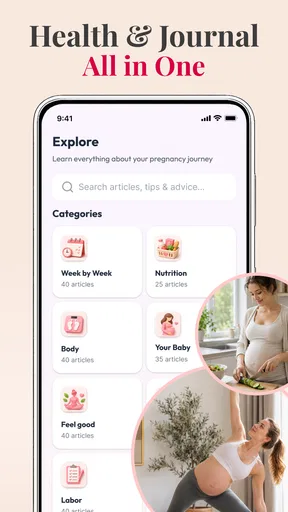
Our Review of Pregnancy Tracker: Baby Growth
 Analysis by Appyee
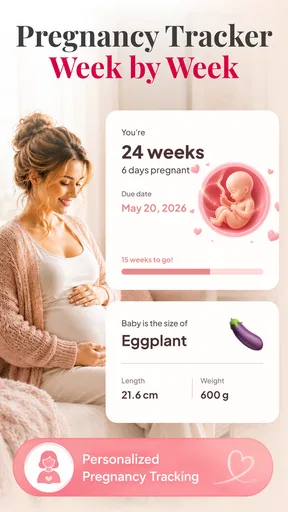
Pregnancy apps can easily become noisy: a calendar, a collection of articles, reminders, shopping suggestions, and a growing list of medical terms all competing for attention. Pregnancy Tracker: Baby Growth takes a more focused route. I found its main appeal in the way it presents pregnancy as a weekly journey, using visual baby-development content to make each stage easier to picture. That makes it feel less like a general health dashboard and more like a calm companion for someone who wants a simple sense of progress.
The app is aimed at expectant parents, especially people who enjoy checking in regularly rather than reading long explanations all at once. It is free to install, carries an Everyone age rating, and comes from Tools for Everyday - AI Tasks. Its Android listing shows over 100K installs, which suggests that it has already reached a meaningful audience without making it feel like a crowded social platform. I would describe it as a lightweight parenting app for following pregnancy week by week, not as a replacement for professional prenatal care.
How the current experience feels in everyday use
My first impression is that the weekly structure gives the app an immediately understandable rhythm. Pregnancy is full of changing dates and unfamiliar milestones, so having the experience organized around the current week is useful. Instead of asking the user to build a personal system from scattered information, the app frames the journey as a sequence of stages. That is a small design decision, but it matters when you are tired, distracted, or simply opening the app for a quick look.
The visual focus is the most distinctive part. The 3D presentation gives baby growth a more tangible quality than a plain paragraph or a static checklist. I would not treat the visuals as a medical measurement, but they can help turn an abstract week number into something easier to understand. For a first-time parent, that sense of scale and development may make the experience more engaging. For someone who already knows the basics of pregnancy, it offers a quick visual check-in rather than another dense lesson.
I can imagine using it during an ordinary evening: after dinner, I would open the app with my partner, look at the current stage, and use the visual content as a starting point for conversation. That is more realistic than expecting either person to study a long article every day. The app works particularly well in these short shared moments, when the goal is connection and orientation rather than research.
The current version is 1.0.1, so I approach it as a relatively early product rather than a mature pregnancy platform with years of accumulated tools. That is not automatically a weakness. A smaller feature set can make a parenting app easier to understand, especially for users who do not want to configure a large number of trackers. Still, the version number is a useful reminder to keep expectations practical: the experience feels centered on its core idea, not on covering every possible pregnancy need.
What the visual week-by-week approach does well
The 3D visuals are most helpful when they support a routine. I would use them at the beginning of each new week, not repeatedly throughout the day. That keeps the content fresh and prevents the app from becoming another source of compulsive checking. A good habit is to pair the weekly view with one personal note elsewhere, such as a question to bring to an appointment or a symptom to mention to a healthcare professional. The app can provide context, while the user keeps medical decisions in the right place.
Another strength is accessibility of tone. A person who finds pregnancy terminology intimidating may find a visual explanation easier to approach than a clinical article. This makes the app suitable for casual family involvement too. A partner, grandparent, or older child can understand the basic idea of weekly growth without needing specialist knowledge. That is a more specific benefit than simply calling the app “informative”: it gives non-pregnant family members an easy way to participate.
There is also a useful trade-off in the app’s narrow focus. Because the experience is built around growth by week, it does not ask the user to turn pregnancy into a project-management exercise. Some people will appreciate that restraint. Others may quickly want more practical tools, such as appointment organization, symptom logging, nutrition guidance, or preparation checklists. The right choice depends on whether you want a visual companion or an all-in-one pregnancy organizer.
What the latest release means for new and existing users
The release information places the app in a current, early stage, with version 1.0.1 available for Android devices running 8.0 or later. For a new user, that means the basic decision is straightforward: if your phone meets that requirement and you want weekly visual tracking, the entry barrier is low. The app is free to start, which makes it reasonable to try before deciding whether its focused approach suits you.
For existing users, a small version increment such as 1.0.1 suggests refinement around the initial experience rather than a completely different product direction. I would not expect a user who already likes the weekly visual format to feel lost after updating. At the same time, I would avoid interpreting the release number as proof of a major feature expansion. The safest reading is that the app is still establishing its foundation, and future improvements may matter more than the current label.
This early stage affects how I judge reliability and value. I care less about whether the app has an enormous menu and more about whether the central weekly flow is clear enough to return to. If the app opens quickly, keeps the current stage easy to find, and presents the visuals without unnecessary distraction, it is doing the important job well. A pregnancy tracker does not need to overwhelm users to be useful.
Tools for Everyday - AI Tasks is the developer behind the app, and the product’s title makes its purpose clear without requiring much explanation. That clarity is valuable in a category where many apps combine pregnancy tracking with unrelated lifestyle content. Here, the stated identity points directly toward baby growth and weekly progress. I see that as a positive for people who want a dedicated visual check-in rather than a broad parenting portal.
Where it fits among usual pregnancy app alternatives
The usual alternative is a full pregnancy suite. Those apps often try to cover calendars, articles, reminders, community discussions, shopping, and health logs in one place. That approach can be convenient, but it also creates clutter. If you already use a separate calendar for appointments or prefer receiving medical advice from your care team, a large suite may give you more than you need. This app’s advantage is concentration: it puts the weekly growth experience first.
Another alternative is a simple pregnancy calendar with text updates. Text-based tools can be better when you want detailed explanations, searchable reference material, or practical preparation advice. They may also be easier to consult when you are looking for a specific question rather than browsing visually. Pregnancy Tracker: Baby Growth is more appealing when the emotional and visual side of pregnancy matters to you. I would choose the text-heavy option for research and this app for a quick, approachable weekly ritual.
There is also the option of using no dedicated tracker at all and relying on appointment notes, a standard calendar, and guidance from a medical professional. That remains a perfectly sensible choice for someone who dislikes notifications or does not want another app involved. The value here is not that every pregnancy requires an app. The value is that a visual weekly view can make the passage of pregnancy easier to follow and share.
One practical workflow is to use this app for orientation, a calendar for appointments, and a trusted healthcare source for medical questions. Keeping those roles separate is better than expecting one small app to manage every part of pregnancy. It also reduces the risk of confusing an engaging visual explanation with individualized medical guidance.
Limitations that matter before installing
The focused design can become restrictive if you want a detailed record of your own experience. A visual growth view is not the same as a personal health journal. Users who need to track symptoms, medication questions, weight changes, appointment dates, or preparation tasks may find themselves switching between several tools. That extra effort is the main friction I would consider before making this a central pregnancy app.
I would also be careful about treating the 3D imagery as exact. Visual representations are useful for understanding a stage, but they should not be used to estimate an individual baby’s size or development. Pregnancy does not follow a perfectly identical pattern for everyone, and an app cannot replace an examination or a conversation with a qualified professional. This is especially important for anxious users who may compare the visual experience too literally with their own pregnancy.
The free entry point is welcome, but in-app purchases range from $2.99 to $11.99 per item. That means I would check what is available without paying before building the app into a daily routine. A free installation does not necessarily mean every part of the experience is free, and users who want predictable costs should pay attention to purchase prompts. The pricing does not make the app unsuitable, but it does add a value question: are the extra elements worth paying for if the core weekly view already meets your needs?
There is a similar consideration for people sharing a device or pregnancy journey with a partner. A visual tracker can encourage conversation, but it is not automatically a shared planning space. If both people need synchronized tasks, appointment management, or collaborative notes, a general family organizer may be a better companion. I would use this app to look and talk together, not assume it will replace a shared household system.
Who will get the most from it
I think the best match is someone who wants a gentle, visual way to follow pregnancy without committing to a large library of tools. It is particularly suitable for first-time parents who enjoy seeing how each week fits into the wider journey. It can also work well for a partner who wants a quick way to understand what stage the pregnancy has reached and participate in the conversation.
It may appeal to people who become overwhelmed by long medical articles. Opening a visual weekly tracker can feel more manageable than searching the internet whenever curiosity appears. The important distinction is that the app is a starting point for understanding, not a final authority for concerns. Used that way, it can make routine check-ins more approachable while leaving clinical questions to the right source.
I would be less likely to recommend it as the only pregnancy app for someone who wants extensive organization. If your priority is logging symptoms, maintaining appointment records, following detailed preparation plans, or reading in-depth educational material, a broader platform will probably serve you better. The same applies to users who dislike visual content or prefer a compact text summary. The 3D presentation is central to the appeal, so it should match your learning style.
People who want a completely free experience should also review the in-app purchase structure before settling in. The app costs nothing to download, but optional paid items can change how complete the experience feels. I would try the free portion during the first weekly check-in, then decide whether the additional content offers a meaningful improvement rather than purchasing immediately.
What I would watch as the product develops
Because the app is still at an early version, I would watch whether future updates deepen the weekly experience without making it cluttered. The most valuable direction would be improvements that preserve the simple visual journey while adding practical context around it. Any expansion should make the current stage easier to understand, not bury it under unrelated features.
I would also look for clearer separation between general educational content and personal medical guidance. That distinction is important in pregnancy software. A strong future version could remain friendly and visual while reminding users to discuss individual concerns with their care team. The app does not need to imitate a clinic; it needs to be clear about what its visual guidance can and cannot do.
Another area worth watching is value for users who do not want a subscription-like relationship with an app. Since purchases are offered per item, the experience may suit people who prefer choosing specific additions rather than paying for everything. The deciding factor will be whether those additions feel genuinely useful or merely necessary to make the basic experience feel complete. I would judge that by trying the core weekly flow first and delaying any purchase until a real need appears.
Device compatibility is also straightforward for Android users on version 8.0 or newer, but anyone using an older phone should check compatibility before planning around it. That requirement is not especially demanding for many current devices, yet pregnancy apps are often installed on phones shared between partners or kept for several years. A quick check can prevent an avoidable surprise.
My recommendation after using the app
Pregnancy Tracker: Baby Growth succeeds when it stays in its lane. Its strongest idea is not trying to become an entire pregnancy management system; it is giving users a visually engaging way to follow baby growth from one week to the next. I found that useful for short check-ins, partner conversations, and making the timeline feel less abstract.
I would recommend giving it a try if you want a free, approachable parenting app with 3D visuals and a clear weekly focus. Keep a separate calendar for appointments and use professional medical advice for symptoms or decisions. That combination lets the app do what it does best without asking it to carry responsibilities it was not designed to replace.
My final view is positive but measured. The current version offers a clear reason to install, and the free starting point lowers the risk of testing it. The main trade-off is that its focused experience may feel too limited for users seeking a complete pregnancy toolkit, while optional purchases deserve a careful look. For someone who wants a simple visual companion rather than a crowded dashboard, this is a pleasant way to make each pregnancy week feel more concrete.
If that sounds like your style, I would start with one normal weekly check-in and ask whether the visuals genuinely help you understand and share the journey. If they do, the app has earned a place in your routine. If you immediately need detailed logs, medical references, or shared planning tools, choose a broader alternative and treat this one as optional rather than essential.
Verdict
Strengths of Pregnancy Tracker: Baby Growth
- Clear weekly updates make pregnancy milestones easy to follow.
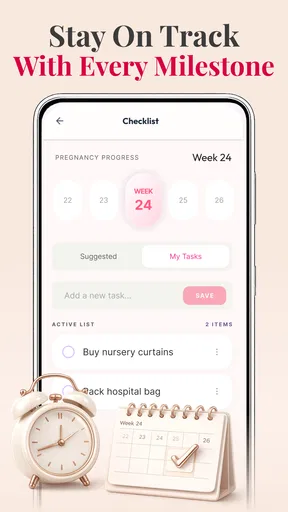
- Useful reminders help users keep track of appointments and key tasks.
- Includes practical tips for nutrition, exercise, and prenatal wellbeing.
- Simple navigation makes the app approachable for first-time parents.
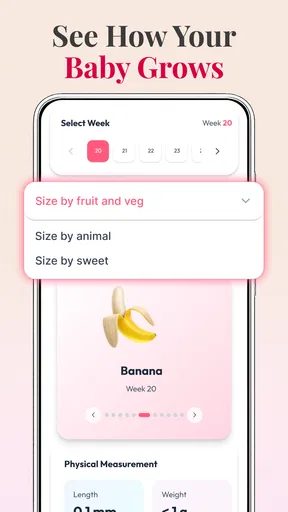
- Baby size comparisons add an engaging way to visualize development.
Limitations of Pregnancy Tracker: Baby Growth
- Some features may require a subscription or include frequent upgrade prompts.
- Information is general and should not replace advice from a healthcare professional.
- Personalization options may feel limited for complicated pregnancies.
- Notifications can become repetitive if too many reminders are enabled.
- Content quality may vary depending on region, language, or device settings.
Other Releases by Tools for Everyday - AI Tasks
View All
X-Score: Live Football Score
Sports4.3

Emoji Battery Widget & Icons
Personalization4.4

Emoji Battery & Shimeji Pet
Personalization4.2
Similar Picks in This Category
View All
Family Space
Motorola Mobility LLC.3.9

شرطة الأطفال - مكالمة وهمية
Oub Apps4.1

Findmykids: Parental Control
LETEM LTD4.6

Pregnancy + | Tracker App
Philips Electronics UK Limited4.8

Policía de niños - para padres
Kids police4.7

Pregnancy App
Amila4.9
Frequently Asked Questions
What is Pregnancy Tracker: Baby Growth used for?
Pregnancy Tracker: Baby Growth is designed to help expectant parents follow the progress of a pregnancy week by week. It typically provides information about fetal development, changes in the mother’s body, pregnancy milestones, appointment reminders, and preparation tips. The app is best viewed as an educational and organizational companion rather than a replacement for professional prenatal care.
Is Pregnancy Tracker: Baby Growth medically accurate?
The app can be useful for general pregnancy education, but its content should not be treated as a personalized medical diagnosis or treatment plan. Pregnancy development varies from person to person, and estimated dates or weekly comparisons may not match every pregnancy exactly. Always confirm important health information, symptoms, test results, and concerns with a qualified doctor or midwife.
Does the app require personal information to work?
To personalize the pregnancy timeline, Pregnancy Tracker: Baby Growth may ask for details such as the last menstrual period, estimated due date, pregnancy week, or other basic information. Some versions may also offer optional profiles, notes, reminders, or account features. Before entering sensitive data, review the app’s privacy policy and check what information is stored, shared, or used for advertising.
Can Pregnancy Tracker: Baby Growth help monitor symptoms and appointments?
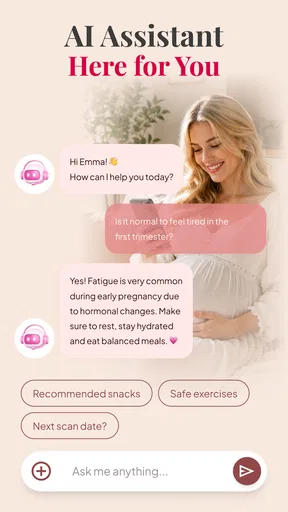
Many users may use the app to record symptoms, track pregnancy-related notes, follow weekly milestones, and remember upcoming appointments. These tools can make everyday organization easier, especially when preparing questions for a healthcare provider. However, symptom tracking is not an emergency service. Severe pain, heavy bleeding, breathing difficulties, reduced fetal movement, or other urgent concerns require immediate medical attention.
Is Pregnancy Tracker: Baby Growth free to download?
The app may be available as a free download, but some features can depend on the version installed and may include advertisements, subscriptions, or in-app purchases. Premium options could unlock additional articles, detailed tracking tools, customization, or an ad-free experience. Check the Google Play Store or Apple App Store listing carefully to review current pricing, trial conditions, and cancellation terms before subscribing.
